




 OAJELS Home



Measuring Color in Adobe Photoshop
Brian Loflin*
Texas A&M University-Kingsville, USA
Submission: August 08, 2024; Published: August 22, 2024
*Corresponding author: Brian Loflin, Texas A&M University-Kingsville, USA.
How to cite this article: Brian Loflin*. Measuring Color in Adobe Photoshop. Open Access J Educ & Lang Stud. 2024; 2(2): 555584. DOI:10.19080/OAJELS.2024.02.555584.
Keywords: Color Perception; Color Measurement; RGB Model; HSL Model; Adobe Photoshop; Digital Imaging; Color Standardization; Lighting in Photography; Color Models; Mid-tone Exposure
Introduction
Color in the English language is an ambiguous term. The vocabulary of colors provides little accuracy to the actual hue, saturation or brightness of a color that can become useful in a natural science setting. Therefore, this method of using Adobe Photoshop software with calibrated digital images provides a standardized numerical method of defining color of subject matter. This numerical standard may be used in communication with absolute universal understanding.
Color (or hue) is a visual perception based on a portion of the electromagnetic spectrum. Color is not an inherent property of matter; however, color perception is related to an object’s light absorption, reflection, and other factors that affect its perception. For humans, colors are visualized in the visible light spectrum with three types of cone cells within the eye.
(Figure 1)
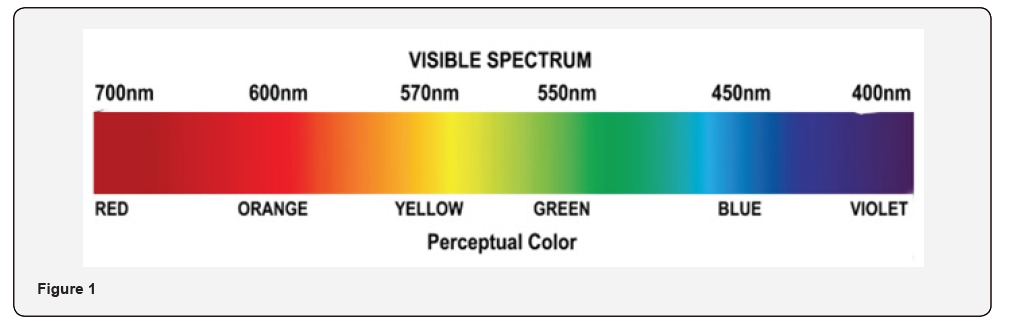
Electromagnetic radiation is characterized by its wavelength and its intensity. When the wavelength is within the visible spectrum it is known as “visible light.” The visible spectrum has a frequency range from about 390 to 710 nm. The familiar colors of the rainbow in the spectrum include those colors that can be produced by visible light of a single wavelength only, the pure spectral or monochromatic colors. The spectrum above shows approximate wavelengths for spectral colors in the visible range.
The physical color of an object depends on how it absorbs or scatters light. A transparent object allows almost all light to pass through, thus perceived as colorless. Conversely, an opaque object does not allow light to transmit through but absorbs or reflects the light it receives. The absorbed light is often dissipated as heat.
The description of any color can become a semantic nightmare. Think for instance, reds are described as Blood Red, Candy Apple, or Fire Engine Red; Blues as Sky Blue, Navy Blue or Aquamarine; Greens as Forrest Green, Hunter Green, or Loden. As one can imagine, there is a plethora of additional terms. Paint manufacturers carry this to an amazing degree. Consider browns as Dark Earth, Antelope, Sahara, or Sand.
Color Spaces
Color naming in the natural sciences must, therefore, be more specific. Therefore, for convenience, colors can be organized in a color space, which when being converted to a mathematical color model can assign each region of color with a corresponding set of numbers.
Color spaces have become a most valuable tool for color reproduction in print, photography, computer monitors, and television. Commonly used color models include RGB, HSL, and CMYK. In this review, the focus will be solely on the first two, RGB (Red, Blue, Green) and HSL (Hue Saturation and Luminance.) The RGB model commonly used in digital photography assigns a numerical value to the proportions of red, blue, and green in the mix of that color. The values range from none, or 0, to a maximum of 255. The other HSL model uses a value in degrees around the color wheel for Hue, and percentage for both Saturation (purity) and Luminance (brightness).
What the Numbers Mean
If we look at the HSL model of the RGB color space color wheel made up of a mix of colors with Red at the top and the other primary colors (Green and Blue) located a third of the way around wheel (1200) we can express all the mixtures as a specific degree around the wheel. Therefore, Red is 00, Green 1200, and Blue 240. That leaves the secondary colors, Yellow at 600, Cyan in 1800, and Magenta at 3000. This plan is illustrated below. (Figure 2)
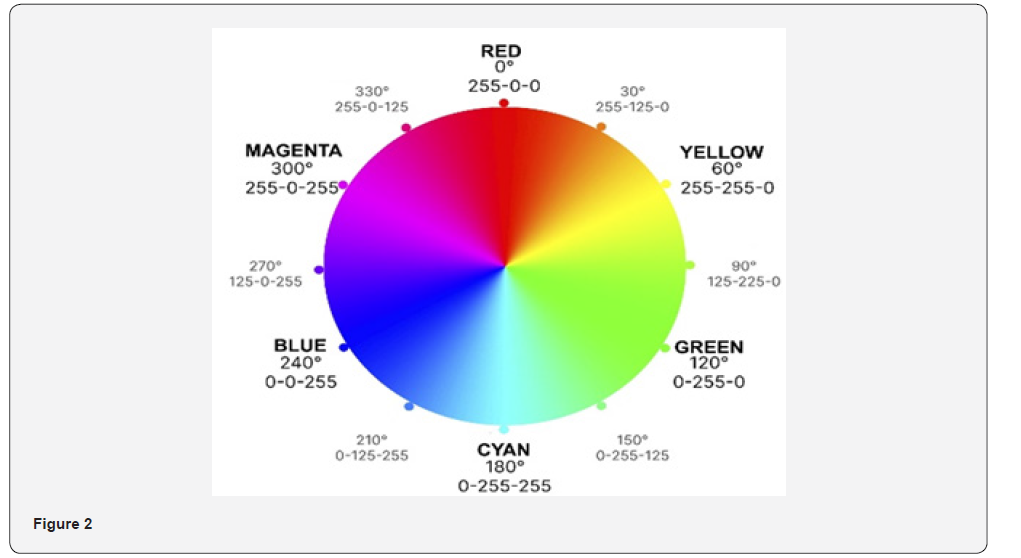
In the RGB model each combination of colors is expressed as a numerical value of Red, Green and Blue as a value from 0 to 255. Thus, Red would be expressed as 255-0-0, Green 0-255-0, and Blue as 0-0-255.
Why Color Matters
In science the assignment of specific color values is necessary to differentiate the characteristic hue of a subject. This is important to measure changes over time, induced changes due to chemical or environmental factors, or disease. Even some species may be differentiated by hue. Soil scientists use color for evaluation of soil quality, including wetness, the inclusion of organic and mineral material. In lieu of the above color models, soil scientists use a standardized Munsell color book to accurately describe a soil color. Again, brown or dark brown is simply not specific.
In publication it is vastly important to reproduce images of subject matter faithfully and true-to-life. Therefore, it is important that the photography be done with utmost care and processing completed using standards rather than “this looks like what I saw” techniques.
(Figure 3)
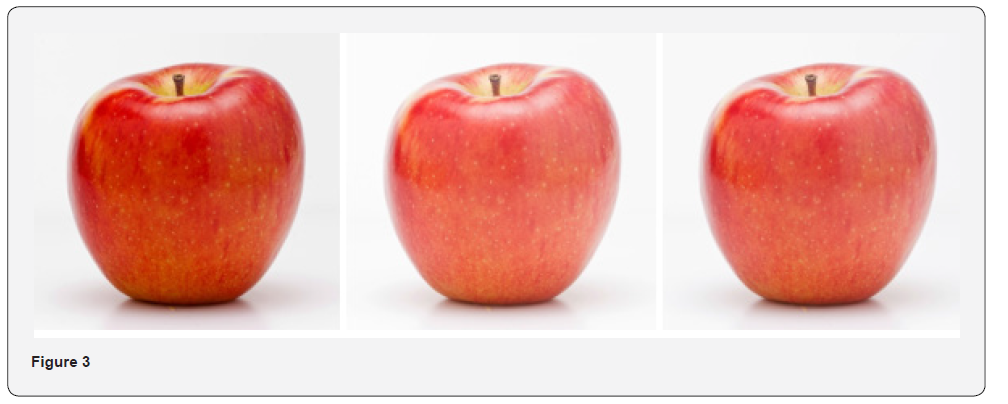
Three exposures if the same apple in the same lighting. Which is correct? The first is one would expect. The second, as shot in camera. The third is the actual, calibrated exposure.
How to Measure Color
To measure color in Photoshop accurately one must begin with an image that has been exposed accurately and has accurate color reproduction. This process is accomplished during the photography using a standard photographic target that provides a neutral (no color bias) and mid-tone (50% reflectance) surface to be included within the image frame.
Lighting
Image capture using digital cameras requires adequate light of the appropriate type. Dependable and readily available lighting must be selected that may be used repeatably without change in intensity and color over time. Open sunlight is good for many subjects in the field. In the lab however, the best illumination is with diffused electronic flash which matches daylight in color and can be evenly distributed across the subject.
The mounting of the flash should provide broad, even lighting for the subject that is free from shadows, hot spots, and interference from other ambient lighting exposure. The environment should be free of nearby colored items that could create color contamination of the subject through reflection.
If the subjects are a dissimilar size, the lighting should be set to cover an area suitable for the largest, as well as the smallest subject without change. Once a standard is established, it should be repeated in the same manner for each measurement session.
Exposure
Camera exposure must be accurate from the onset. The goal is to achieve an accurate mid-tone exposure from a mid-tone standard subject. A standard laboratory Gray Card* should be included in the scene and the exposure of that target area adjusted until a mid-tone exposure results. This camera exposure is now the standard throughout all measurements.
(Figure 4)
After the baseline exposure is established, a Lab Standard Color Swatch** should be photographed using the same technique without modification. This exposure will be used with every test subject to set the standard color balance and exposure in all test subjects to eliminate photographic variables. All comparative test subjects must be photographed using the settings as above without change.
Processing
All subject images should be opened together with the Color Swatch image in Adobe Camera Raw. The Color Swatch image should be processed for perfect Mid-tone Exposure and Color Balance. That image data, including White Balance and Exposure, must be then synchronized with the remaining test subject images. This results in every exposure and color balance of each image is without variance except for the subject’s inherent color. These images should now be opened in Photoshop without further processing.
Once in PS, the image is sized on the monitor so that details are easily viable.
The color Picker Eye Dropper tool is selected, and the sample size is set to something that covers a reasonable representative portion of the area to be measured. The sample size is variable from “point sample” to 101 x 101 pixels. A mid-range of something like 31 x 31 pixels will provide a good average and will avoid aberrations by tiny spots or flecks of color in the subject surface. The tool should be set to measure Current Layer Only as below:
(Figure 5&6)
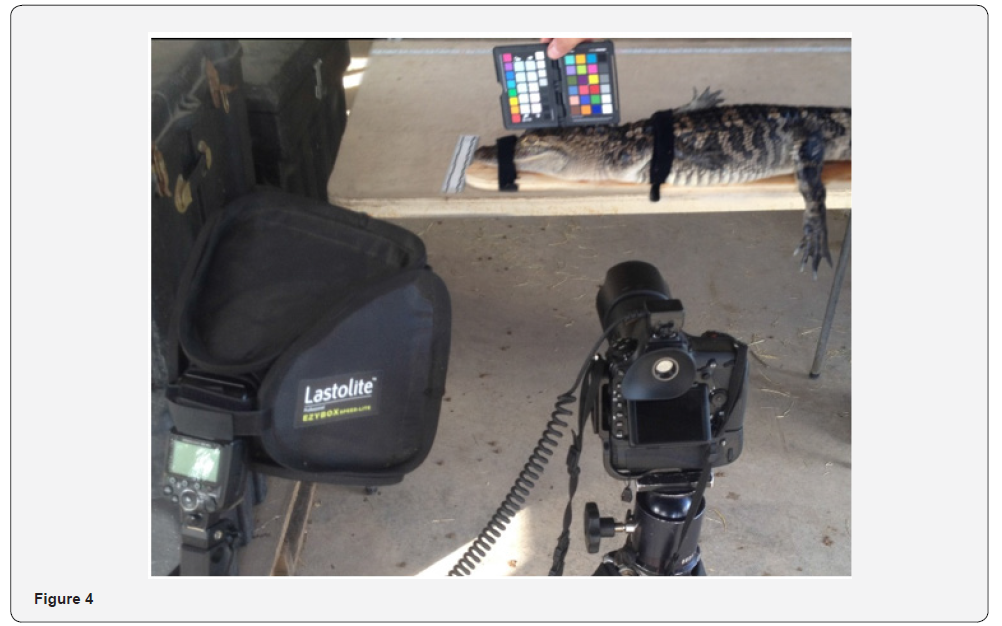
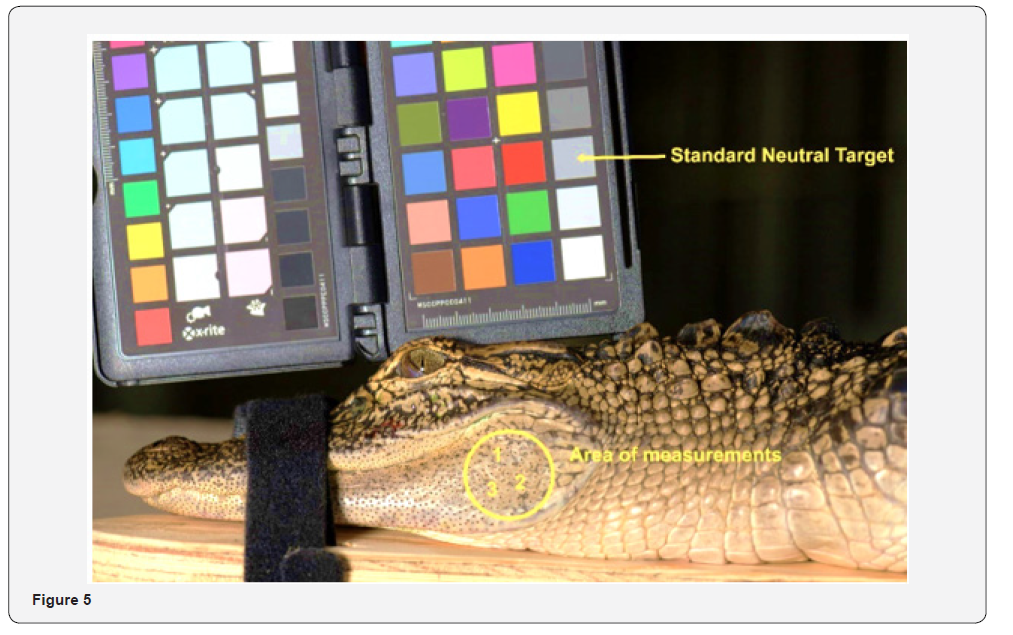
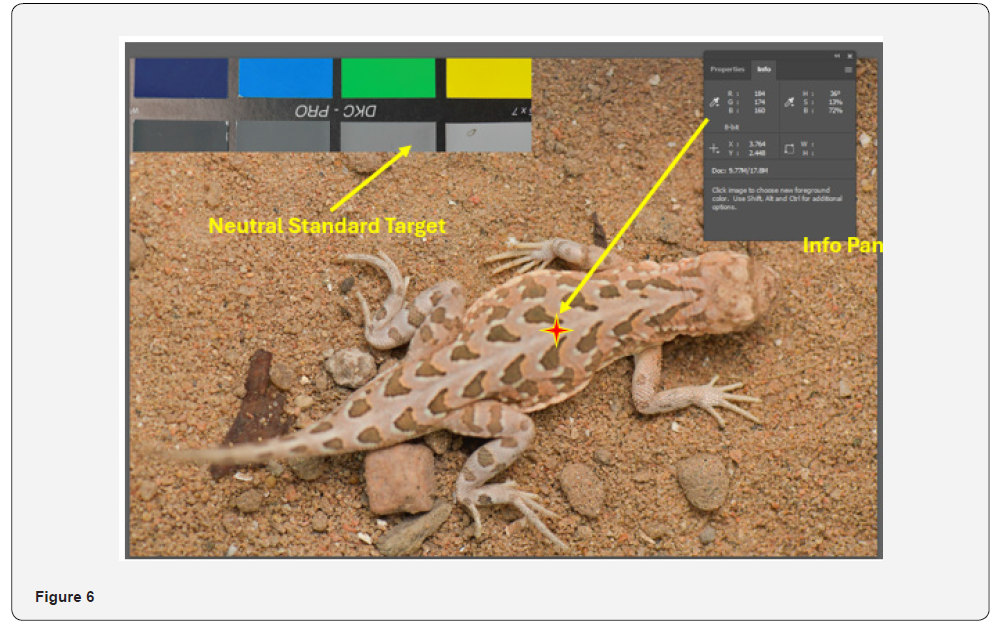
An alternative setup using another color standard target in the image frame of Spot-tailed Earless Lizard, (Holbrookia sp).
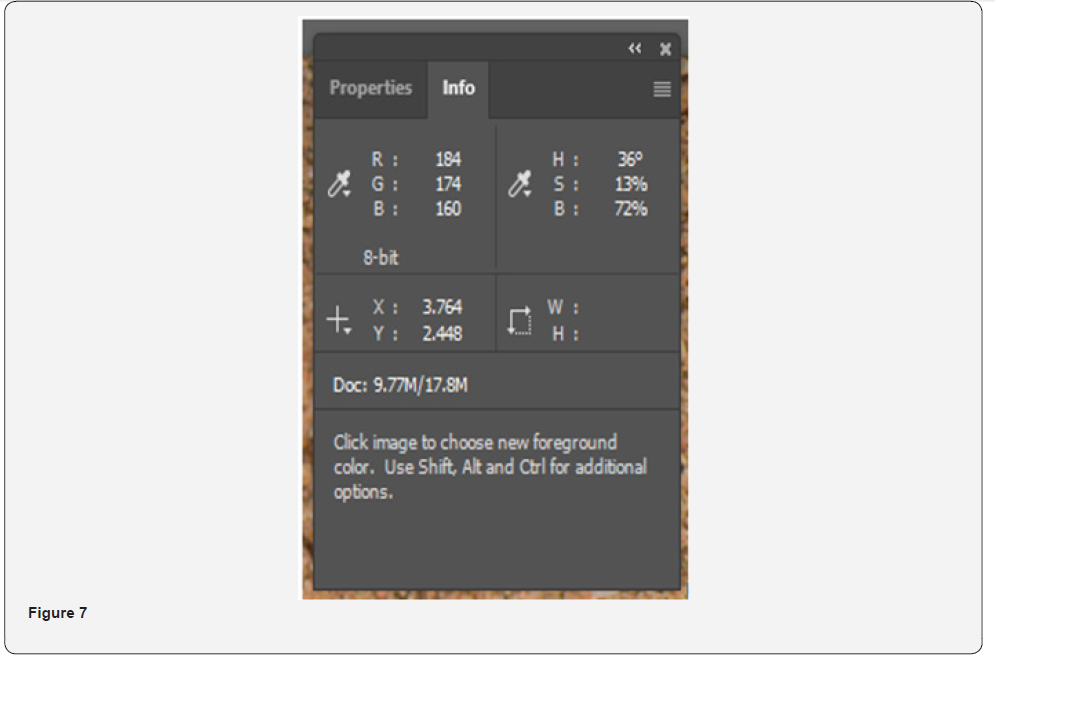
The Info Tab should be opened and set up to provide RGB Color as the First Color Readout and HSB Color set up as the Second Color Readout. The values for RGB or HSB (HSL) are taken directly from the info panel. See image below:
(Figure 7)
Info Panel: Notice values for RGB and HSB (HSL)
Results
Once comparative sample subjects have been photographed and calibrated uniformly, the processing and measurement may begin.
Rather than taking a measurement of a single spot, it is suggested to take a series of measurements across a small area of the surface of the subject image without anomalies to then derive a more accurate overall average. RGB measurements may be entered into a spread sheet for further data set analysis. See sample below:
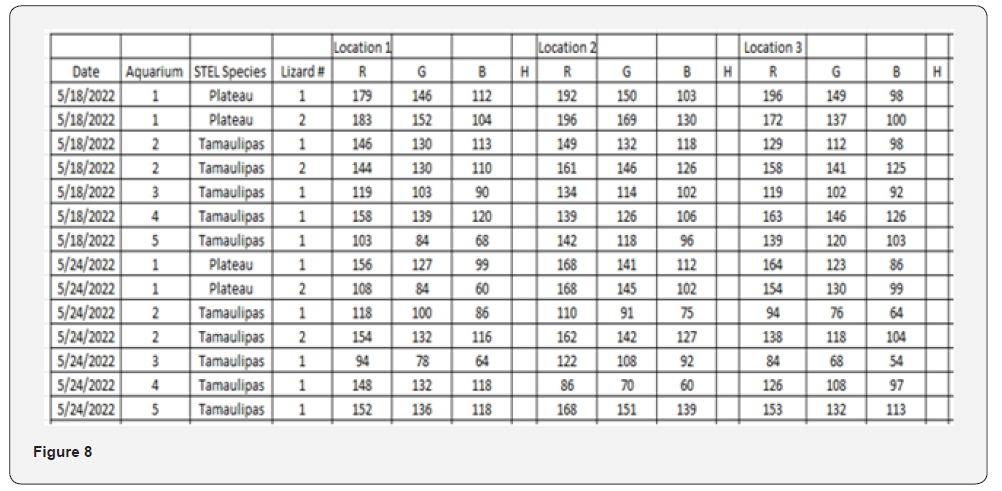
(Figure 8)
A series of measurements of color variations in two species of Spot-tailed Earless Lizards (Holbrookia lancerata and H. subcaudalis)
Using this method of measurement in digital images using Adobe Photoshop can provide a standard numerical value for each color (hue) rather than a text attempt to describe the color in words.
Brian Loflin is a highly respected photographer, author, teacher, and consultant. His seasoned professional career spans more than five decades in the advertising, aviation, bio-medical and publishing industry.
Brian is a graduate biologist with an extensive background in marketing and communications. As a highly regarded teacher, his passion is in passing his knowledge and vision along to others. He developed and taught a curriculum of Wildlife Photography at Texas A&M University-Kingsville. He held similar teaching positions at the University of Texas at Austin, University of California at Riverside and Riverside Community College.
*Eastman Kodak R-27 Gray Card product number #1903061
** XRite Color Checker Mini, product number #MSCCMN-RET -or-
XRite Color Checker Passport, Product number MFR #CCPP2
Copyright © 2024 Brian Loflin. All rights reserved.